


Under construction
Download the presentation
A white business jet parked on an airport apron at sunrise, seen from the front.

One platform for your whole flight department

HangarBridge will bring state aircraft fleet operations into one connected record: maintenance, scheduling, crew, parts, fuel, flight line, billing, reports, documents and mobile access.

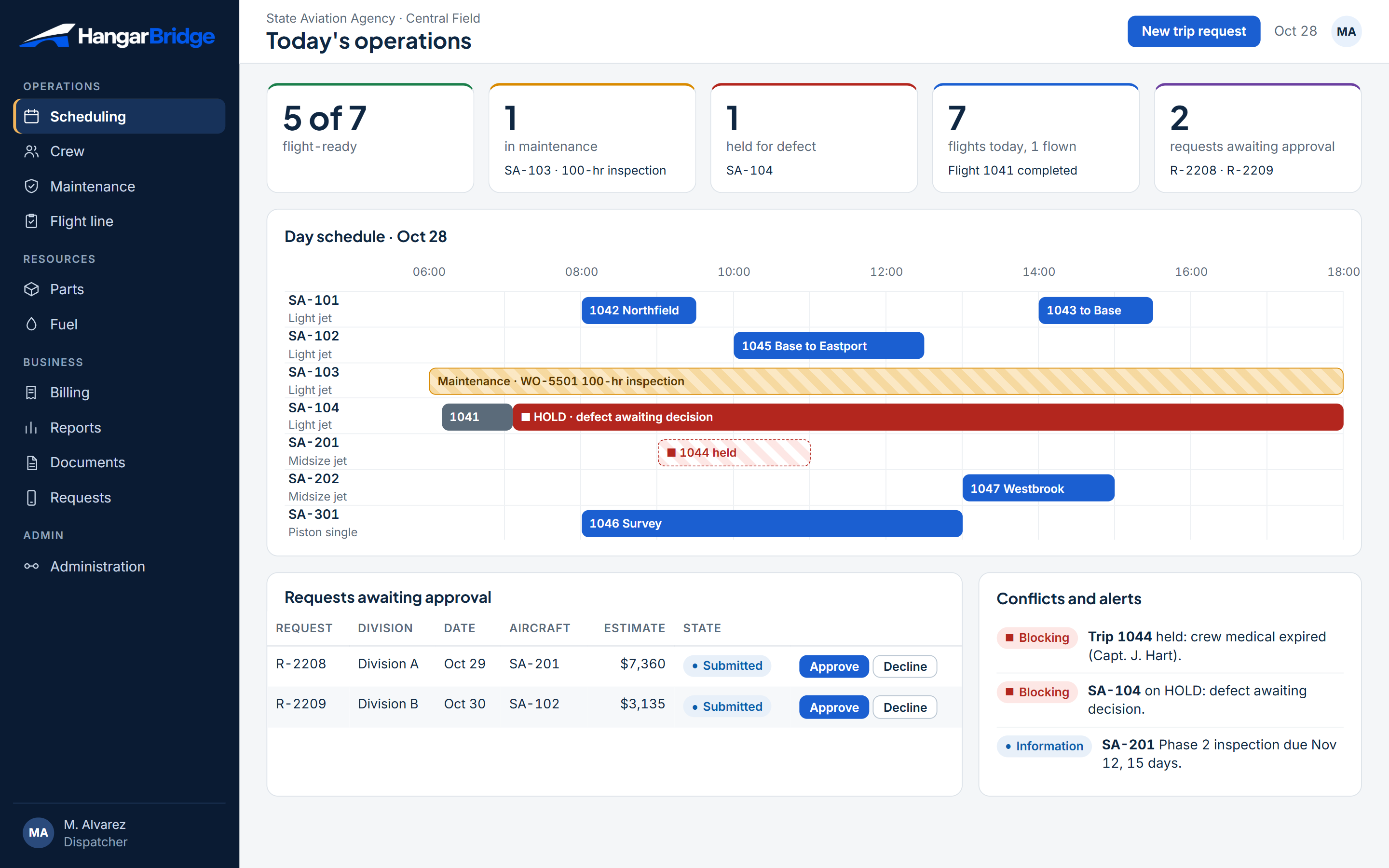
Today's operations: counters for aircraft readiness, a day timeline by aircraft with a held flight and a maintenance window, pending requests and alerts.

Log a flight once. Everything else follows.

When the post-flight log is closed, HangarBridge would update hours and cycles in maintenance, post fuel burn to the tanks, draw parts against work orders and create the charge line for billing, each with a signature and an audit trail.

Maintenance+0.7 h, +1 cycle
Fuel76 gal burn
Partsoil filter issued
Closed post-flight log
Billing0.7 h charge line
ReportsKPIs refresh
A business jet inside a large aircraft hangar with the doors open.

Ramp and hangar work done on a checklist, signed, and visible to everyone who depends on it.

Eleven modules, one record

A technician reaching up to inspect the underside of an aircraft wing.
M1

Maintenance and Airworthiness

Know what is due, what is blocked and what is safe to fly, before the schedule does.

  • Fleet status board - cards for past due, within tolerance, coming due, open discrepancies, deferred items and items needing review.
  • Due list with projection - hour, cycle and calendar limits with remaining balance, projected against scheduled flights.
  • Inspection programs - an active program per aircraft (annual, hour-based, phase) with a named scheduler and 90/60/30-day notices.
See more (8)
  • Directives and bulletins - airworthiness directives and service bulletins linked to aircraft, component and work order; recurring items show the next due date.
  • Review area for new directives - changes wait for a decision by the responsible person before they enter the due list.
  • Life-limited components - part and serial number, hours or cycles installed, remaining life, install and removal dates, full history.
  • Post-flight log - one source for times, landings, cycles and hours; only rising values reach the due list; a closed log is locked and corrected by amendment.
  • Defects and deferrals - crew reports with a photo; maintenance decides: clear, corrective action, or defer by category with a due date and flight limitation.
  • Work orders - items by role, estimated versus actual hours and cost, parts, attachments, sign-off per item, outside-shop release documents.
  • Records and signatures - one electronic signature per person, server time stamp, immutable once signed; logbook entries generated for airframe, engine and propeller; full record package exportable (PDF, Word).
  • Dispatch hold - an overdue inspection, directive or life-limited part turns the aircraft HOLD and blocks release; a notice can be acknowledged without changing the real balance, and an exception needs documented approval.

Aircraft wing in silhouette against the setting sun.
M2

Flight Scheduling and Dispatch

One calendar for aircraft, people and maintenance, and a release step that cannot be skipped.

  • Day schedule - timeline by aircraft with maintenance windows and crew rest shown on the same view.
  • Trip requests - states Draft, Submitted, Approved, Declined, Cancelled; approver, dispatcher note, restrictions on approval and history.
  • Cost estimate before approval - estimated hours and charge shown to the requester and approver.
See more (9)
  • Conflict and feasibility alerts - aircraft versus maintenance, crew duty and rest, qualification, airport and documents, each with a severity (information, warning, blocking).
  • Readiness traffic light - aircraft, crew, fuel, passengers and handling each show DO, REQ, HOLD, OK, REVIEW, NR or NA; the flight shows the worst item.
  • Flight release - dispatch submits, an authorized person releases; open items are shown at release; each release is a numbered snapshot.
  • Automatic revert - if aircraft, airport, time, crew, maintenance or passengers change after release, the flight returns to DO and people are notified.
  • Passengers and travel log - manifest, qualification status per person, a signed travel log for each passenger and crew member.
  • Flight classification - a per-flight category (for example public, civil, mixed) configured by the agency, with the passenger list that supports it.
  • Change notices - requesters, crew and releasers are told when a flight changes or is approved (channels in M11).
  • Crew assignment - positions on each flight (for example captain, first officer) filled from the qualified, rested roster.
  • Trip sheet and calendar entry - itinerary for passengers and crew, with calendar entries updated when the flight changes.
Flight deck control panel with illuminated screens.
M3

Crew and Qualifications

Only qualified, rested people on the schedule, and a warning long before anything expires.

  • Roster and roles - pilots, mechanics, fuelers, dispatchers and managers in one list with their authorizations.
  • Qualification tracking - medical, aircraft type, currency and recurrent training with expiry dates.
  • Expiry alerts - 90/60/30-day notices to the person and the manager.
See more (7)
  • Duty and rest indicators - green, amber, red against configurable limits, shown on the schedule.
  • Assignment guard - an expired item blocks the assignment, with a manager override that is recorded.
  • Fit-for-duty acknowledgment - confirmed by the crew member at release.
  • Maintenance staff certificates - mechanic and inspector certificates and authorizations, with the work each may sign.
  • Fueler training - validity tracked on a configurable cycle (for example every 24 months).
  • Crew mobile view - upcoming trips, change alerts and log signature on a phone (see M11).
  • Crew briefing - trip briefing sent to the crew, with accept or decline recorded.
Close-up of a turbofan engine inlet and fan blades.
M4

Parts and Inventory

The right part, with its paperwork, on the shelf and tied to the work order that needs it.

  • Catalog - serialized or not, consumable, capital equipment, alternate part numbers, unit and cost.
  • Stock cards - expired, below minimum, above maximum at a glance.
  • Min/max and reorder - a reorder request is created automatically when stock falls below minimum.
See more (9)
  • Requisitions and purchase orders - Routine or AOG priority, states from draft to received, due dates.
  • Receiving - lot, supplier, certificate and quantity recorded; barcode or QR scan.
  • Issue to work order - reserve and issue parts against a work order, with cost flowing to billing.
  • Quantities by state - on hand, in repair, installed, quarantined, allocated, on order.
  • Cycle counts - scheduled counts with variance review.
  • Installation guard - a part without complete history, release certificate or valid shelf life cannot be installed.
  • Asset tags - state property number on aircraft and capital items.
  • Core and repair orders - track items sent for repair or exchange.
  • Part history per aircraft - where each part was installed and removed, the work order, and the meter reading at that moment.
Orange sky over an airfield horizon at dusk.
M5

Fuel Management

Every gallon accounted for, from delivery to aircraft to invoice.

  • Locations - hangar tanks, trucks and off-site suppliers with on-hand quantity.
  • Deliveries - receiving with lot, supplier, certificate and quantity.
  • Quality checks - sediment and water checks, filter and truck inspections with responsible person and date.
See more (6)
  • Uplift per aircraft - fuel type, quantity, price and location for every fueling.
  • Burn from the flight log - departure and arrival fuel, density and temperature, calculated consumption.
  • Daily reconciliation - variance by location traced back to the flights behind it.
  • Price table - price by location, loaded from a spreadsheet; alert when a price exceeds the contract.
  • Fueler readiness - training validity shown before a person is assigned.
  • Fuel to billing - fuel cost passes to the charge record of the flight.
A business jet inside a large aircraft hangar with the doors open.
M6

Flight Line and Hangar Operations

Ramp and hangar work done on a checklist, signed, and visible to everyone who depends on it.

  • Pre-flight checklists - per aircraft type, with notes per item and a progress counter (for example 3/5), at departure and arrival.
  • Missing-form alert - a flight without a completed pre-flight form is flagged before release.
  • Aircraft sign-out and sign-in - signed handover between crew and line staff.
See more (6)
  • Ground-service requests - request, flight announcement and quote to fuel and service providers, with REQ and OK states.
  • Aircraft turn timeline - arrival, servicing, fueling, departure on one line.
  • Hangar and parking assignments - where each aircraft is, and what is scheduled to move.
  • Line tasks on mobile - tasks and checklists on a phone, with photo attachment.
  • Ramp check - a quick report of open checklist items across the fleet.
  • Towing and hangar moves - tow requests and planned moves between hangar bays, with a signed handover.
Black and white close-up of a business jet fuselage and engine.
M7

Billing and Cost Recovery

Every flight turns into a documented charge, and every charge carries the basis it was made on.

  • Rate tables - rates by aircraft and service, by fiscal year, with effective dates, a documented calculation and optional minimums per leg or per day.
  • Cost components - fixed, navigation, maintenance, variable crew and fuel shown separately, with an optional capital component.
  • Automatic charge lines - flight time, fuel, labor and parts captured from closed logs and work orders.
See more (8)
  • Charge records by flight - one line per flight and division, with totals that match the invoice.
  • Legal basis per charge - a configurable field (agreement, statute or rule, policy, other) with the reference as given by the agency.
  • Release gate - a charge cannot move to Ready to invoice without a legal basis; who entered it and when is kept.
  • Invoice states - not invoiced (with automatic date), invoiced, paid; allocation to division or cost center.
  • Work-order billing - customer reference, parts, labor, administrative fee and outside services on the work order.
  • Receivables aging - buckets and an escalation step configurable by the agency.
  • Accounting export - CSV or API with date range and row status.
  • Annual usage report - hours, flights, cost and destinations per aircraft.
Airport surveillance radar on a white tower against a clear sky.
M8

Reporting and Analytics

The same numbers, for every role, without a spreadsheet in between.

  • Role dashboards - operations, maintenance, finance and leadership views.
  • Saved and shared reports - scope, category, visibility and a schedule label.
  • Scheduled delivery - by e-mail; download as Excel, CSV and PDF.
See more (7)
  • Utilization - hours, flights and cycles by aircraft, type and division.
  • Availability and downtime - days out of service and maintenance turnaround.
  • Fuel differences - variance report by location and period.
  • Cost per flight hour - cost against cost recovered.
  • Forecasting - projected hours drive upcoming inspections, parts demand and cost, including a cost projection by fiscal year from scheduled hours and rate tables.
  • Data-quality watchlist - logs missing, records not synced, forms not completed.
  • Open-format export - all data exportable at any time.
A white business jet parked on an airport apron at sunrise, seen from the front.
M9

Integrations, Administration and Security

Fits into the systems you already run and keeps every action traceable.

  • Documented API - REST API and event notifications for current and future systems.
  • Accounting and ERP exchange - charge and invoice export mapped to the agency's finance system.
  • Fuel transaction import - supplier and fuel-card files matched to fuelings.
See more (9)
  • Single sign-on - with the agency's identity provider where available.
  • Directory and HR import - crew and staff lists kept current.
  • Integration status - each exchange shown with status, time and retry.
  • Roles and permissions - dispatcher, releaser, maintenance, inspector, technician, contract manager, viewer.
  • Audit trail - who created, viewed, changed and exported what, and when.
  • Retention rules - configurable by record type; deletion blocked before the date; status records kept while the aircraft exists.
  • Data ownership and exit - open-format export at any time; backup with tested restore; deactivated users keep their historical signatures.
  • Accessibility - interface designed to WCAG 2.1 AA.
  • Spreadsheet import and export - rate tables, fuel prices, schedules and reports loaded from or sent to a spreadsheet, with a preview before saving.
Flight deck control panel with illuminated screens.
M10

Documents and Compliance Tracking

Every document and every person's paperwork current, with a warning before anything lapses.

  • Document library - aircraft, fleet and company documents (registration, airworthiness, insurance, manuals, weight and balance) with version, file and owner.
  • Validity and alerts - expiry dates with 90/60/30-day notices to the owner and the manager.
  • Onboard document set - the documents each aircraft must carry, checked at release.
See more (3)
  • Personnel compliance board - which people are current, due soon or expired (medical, training, certificates), in one view.
  • Manual and procedure revisions - a new revision is sent to the people affected and their acknowledgment is recorded.
  • Safety reports (optional module) - hazard or occurrence report, risk rating, corrective actions with an owner and a due date.
A white business jet parked on an airport apron at sunrise, seen from the front.
M11

Mobile, Requests and Notifications

The same record on the ramp, in the cockpit and at the requester's desk.

  • Mobile app for crew and technicians - trips, post-flight log, checklists, defect report with a photo, signatures and training dates on a phone or tablet.
  • Offline entry (target design) - log and checklist entries saved on the device without a connection and synced when it returns.
  • Requester portal - agencies submit a trip or service request, see the cost estimate, and follow the status through to the invoice.
See more (5)
  • Request states - Draft, Submitted, Approved, Declined, Cancelled, with the reason and the history.
  • Cost estimate and approved estimates - estimated hours and charge shown before approval; for work orders, the customer approves the estimate online.
  • Notifications - e-mail and app alerts for request status, flight changes, approvals, expiring items and defects.
  • Notification preferences - each person chooses which notices to get and by which channel; critical notices cannot be switched off.
  • Text alerts (optional) - short messages for urgent changes, where the agency allows.
Orange sky over an airfield horizon at dusk.

One connected record

See how it could look

Black and white close-up of a business jet fuselage and engine.

Know what is due, what is blocked and what is safe to fly, before the schedule does.

Traceable, accessible, yours to take with you

Signed, locked records

Entries are signed with a single electronic signature and locked; a correction is a new entry that points to the old one.

Full audit trail

Who created, viewed, changed and exported each record, and when.

Designed to WCAG 2.1 AA

An interface designed for accessibility from the start.

Your data, open formats

Open-format export at any time.

Flight deck control panel with illuminated screens.

The same record on the ramp, in the cockpit and at the requester's desk.

A maintenance technician smiling and holding a laptop in a workshop.

Custom-built around your process

Workshop with Flight Services to confirm rules, fields and approvals.
A fixed-scope discovery phase.
Module-by-module delivery, starting where the pain is greatest.
Support and hosting after go-live.

We would build and configure HangarBridge around your process.

Take the presentation with you

A 24-page overview of all eleven modules with screens.

Pricing is by quote.

Aircraft wing in silhouette against the setting sun.

Request a quote

Tell us about your fleet and which modules matter most. We reply by e-mail.

Moacir Pereira Junior, Managing Member, Prima Pobre LLC

Please do not include confidential, personal or security-sensitive information.

Questions

How would HangarBridge be delivered?

Custom-built and configured around your process, module by module, starting where the need is greatest.

Who is behind it?

Prima Pobre LLC, a U.S. company (Florida) that develops custom software.

How is it priced?

By quote, based on modules, aircraft and users. Request a quote above.

Can it follow our own rules?

Yes, that is the design: limits, approval steps, rate tables, retention periods and the legal basis for each charge will be configuration.

Can we take our data with us?

Yes. Open-format export at any time is part of the design.